
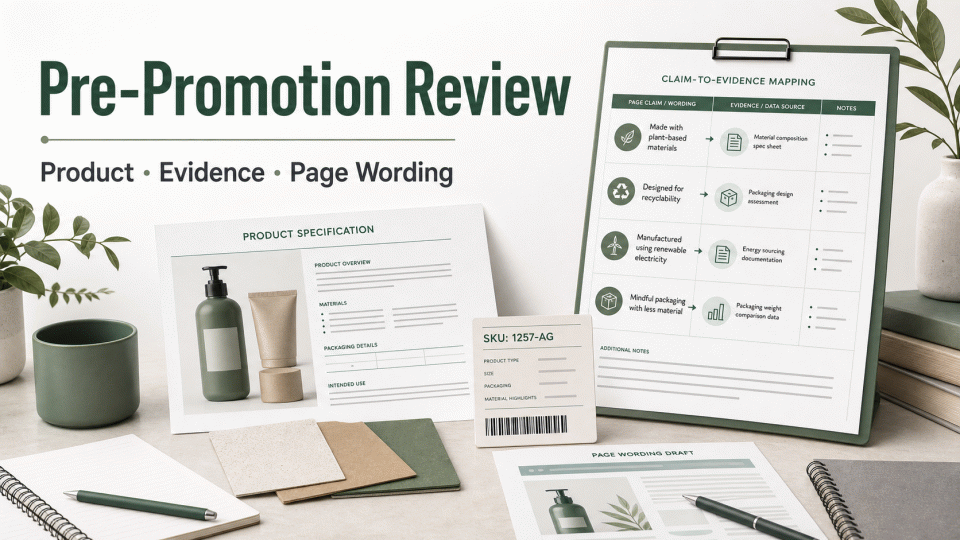
A pre-promotion review is not a race to place every certificate in one folder. It is a check that each environmental statement can be traced to a specific product, version, and supporting record. The outcome should be recorded as verified, pending evidence, or not ready for use—not as a presumed platform or regulatory result.
1. Define the review object
Create one record for each SKU: product name, model or ASIN, sales market, packaging version, production or change version, proposed environmental attribute, and accountable reviewer. Separate products when formula, material, size, packaging, or supplier differs; a brand or product-family name is not enough to merge them.
Separate the work into four categories: product or packaging attributes; certification or labeling programs; platform page fields and creative requirements; and mandatory market requirements. Record scope, responsible party, evidence source, and current version for each category.
2. Build a claim-to-evidence-to-page map
Every proposed statement should point to a supporting record. A recycled-content statement may connect to material composition or supply-chain records. A recyclability statement should identify whether it refers to the product, packaging, or a component and state relevant conditions. A packaging-reduction statement should trace to packaging structure, weight, or version-comparison data. Broad terms such as “green,” “eco-friendly,” or “sustainable” are not evidence by themselves.
Keep an evidence index with file name, issue or creation date, covered product and version, data or test scope, issuing party, original-file location, reviewer, and notes. For supplier records, check the holder, product scope, and supply-chain relationship against the current SKU. A third-party file is not automatically applicable merely because it exists.
Page wording should use the same scope and qualifications as the evidence. If the evidence supports packaging only, do not present it as a property of the whole product. For US-facing copy, the FTC Green Guides provide a useful general reference: specific qualifications and competent, reliable scientific evidence are more defensible than an unqualified broad green claim.
3. Review sequence before a promotion
1. Product and version. Match the SKU, formula or material, packaging, label artwork, instructions, and page imagery to the same version, and record the latest change.
2. Evidence scope. Read the original certificate, report, material statement, or quality record. Confirm its object, scope, conditions, date, and issuing party; do not substitute a file name, cover page, or verbal assurance for review.
3. Chain of records. For recycled, organic, chain-of-custody, or carbon-data claims, check whether purchasing, production, batch, transaction, and quantity records point to one another. If the chain breaks, narrow or pause the wording rather than filling the gap with an assumption.
4. Page and creative. Review titles, selling points, detail pages, packaging text, images, and structured attributes. Confirm that claims stay within the evidence and that a certification mark, platform program name, or review status is not presented as a product attribute.
5. Version control. Save the review date, file hash or version number, before-and-after wording, and open actions. Reassess after evidence, product, supplier, or platform-rule changes; do not assume one universal validity period or processing time.
4. Common mistakes and practical corrections
Treating a platform program as a regulation: platform programs have their own materials and page requirements and do not replace a market-access assessment. Keep the applicable program-page version and review current requirements separately.
Turning a certification name into a product conclusion: the certified object may be a company, site, material, supply chain, or product. State the object and scope instead of implying that certification makes the whole product environmentally preferable.
Using an old report for a new version: a change in product, formula, site, packaging, market, or test method can affect applicability. Assess the change first, then decide whether page wording can remain.
Using a promotion date as a guarantee: campaign dates may support internal scheduling, but should not be written as a guarantee of review, platform display, certification, or other outcome. Mark unverified files as pending and assign an owner.
5. A review-record format
Use one row per claim: SKU/version | target market | page wording | claim object | qualifications | evidence file and source | scope and date | entity match | page location | review conclusion | missing material | owner | next review trigger. 绿色方舟(深圳)认证有限公司 can help organize the record, but the responsible party must confirm the underlying facts, evidence, and published wording.
The useful output is a traceable decision record: what can remain, what needs qualification, what should not be used yet, and where each decision is supported. It is not a certification, platform approval, selling authorization, or promise of an outcome.